
Packaging design has evolved far beyond simple dielines and mockups. Today’s packaging professionals need CAD software that can create structural designs quickly, visualise concepts in 3D, and streamline production workflows without months of training.
The challenge is that many CAD platforms are built for engineers first and packaging designers second. That often leads to steep learning curves, cluttered interfaces, and expensive implementation processes.
Fortunately, some packaging CAD solutions are designed specifically with usability in mind. Among them, KASEMAKE stands out as one of the easiest and most intuitive systems for new users to learn.
You can learn more about KASEMAKE Packaging CAD Software and its licensing options directly from AG/CAD.
What makes packaging CAD software easy to learn?
Not all CAD software is created equally. The easiest systems to learn usually share several important characteristics
- A clean, intuitive interface
- Packaging-specific tools rather than generic CAD functions
- Built-in design templates
- Real-time 3D visualisation
- Fast onboarding and training
- Simple import/export workflows
- Minimal reliance on scripting or programming
For packaging companies, ease of learning matters because faster onboarding means designers become productive sooner, reducing training costs and improving workflow efficiency.
Why KASEMAKE is considered one of the most intuitive packaging CAD platforms
KASEMAKE was developed specifically for the packaging and POS/POP display industries, which is one reason it has gained a reputation for being highly approachable for both experienced structural designers and newcomers.
According to AG/CAD, KASEMAKE features an “intuitive and user-friendly interface” that contributes to a “smooth learning curve and fast adaptation.”
Unlike general-purpose CAD software that requires extensive customisation for packaging workflows, KASEMAKE includes tools designed specifically for
- Corrugated packaging
- Folding cartons
- POS/POP displays
- Die making
- Sample creation
- 3D packaging visualisation
This industry focused approach makes the software easier to understand from day one.
Built in templates help new users learn faster
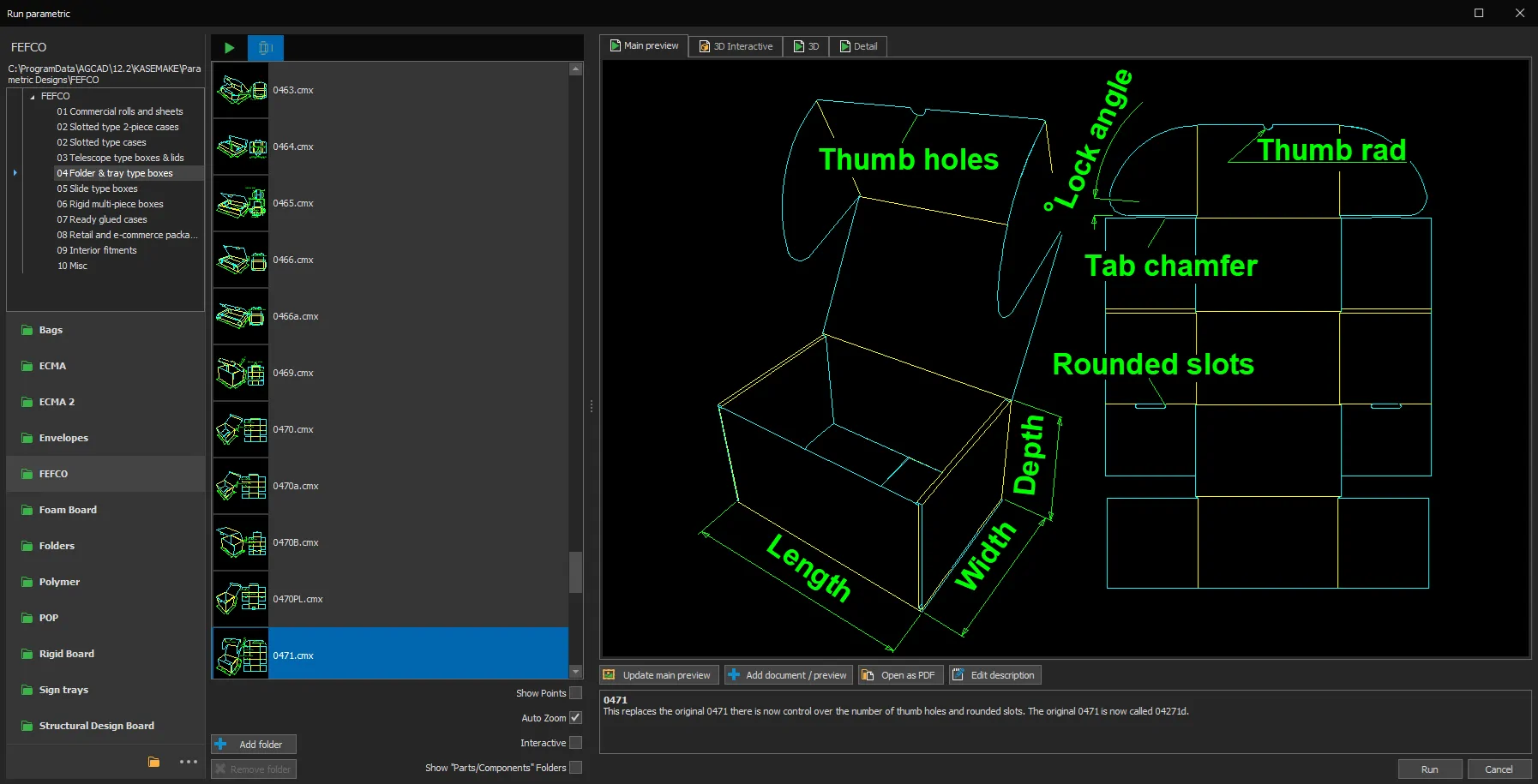
One of the biggest advantages of KASEMAKE is its library of more than 1,000 customisable design templates.
Instead of drawing structures entirely from scratch, users can
- Select a standard packaging style
- Enter dimensions and material information
- Automatically generate a production-ready dieline
This dramatically shortens the learning curve for new designers and helps teams produce accurate designs more quickly.
Real time 3D visualisation simplifies design approval
Another reason many designers find KASEMAKE easy to learn is its real-time 3D folding and visualisation tools.
Users can instantly convert flat structural designs into realistic 3D packaging mockups with artwork applied. This helps designers
- Spot structural issues early
- Present concepts to customers faster
- Reduce prototyping costs
- Improve communication between teams
Because changes update visually in real time, users can understand packaging structures more naturally than with traditional 2D-only CAD workflows.
Flexible licensing options. Subscription or perpetual licence
One major advantage of KASEMAKE is its flexible purchasing model.
Many CAD platforms today are only available via recurring subscriptions, which can frustrate businesses looking for long-term ownership and cost control. Industry discussions frequently highlight the growing demand for perpetual CAD licences alongside subscription models.
KASEMAKE offers both
- Perpetual licence purchase for companies that prefer to own a software licence
- Monthly or yearly subscription options for businesses that want lower upfront costs and ongoing updates
AG/CAD states that KASEMAKE is available “on a monthly or yearly subscription basis, or as a one-off purchase.”
This flexibility makes it appealing to
- Small packaging businesses
- Independent designers
- Startups
- Large manufacturing operations
- Companies scaling their design departments
Subscription plans also include software updates and technical support while active.
A good fit for both beginners and experienced designers
Ease of use does not mean limited functionality. KASEMAKE combines accessibility with professional grade tools including
- 2D structural drafting
- 3D rendering
- Parametric packaging libraries
- Artwork integration
- Database management
- Die-making functionality
- Machine and cutter integration
This means designers can start with basic workflows and gradually expand into more advanced production processes without needing to change platforms later.
Final Thoughts
For packaging professionals searching for CAD software that is quick to learn without sacrificing capability, KASEMAKE is one of the strongest options available today. Its intuitive interface, packaging-specific workflow, built-in templates, and real-time 3D visualisation help reduce the learning curve significantly compared to many traditional CAD systems. Equally important, KASEMAKE offers flexibility in how businesses purchase the software, with both perpetual licence purchases and subscription plans available. That combination of usability and licensing choice makes it especially attractive for companies looking to invest in long-term packaging design efficiency.
