
 Launching a new product involves more than creating an attractive logo or choosing eye-catching colours. Packaging design helps protect your product, support your brand and improve the customer experience. It also affects how easily goods can be made, stored and shipped.
A well-designed package needs to balance creative ideas with a strong structure and suitable materials. It should also be easy to produce while keeping costs under control. Many packaging companies use specialist CAD software such as KASEMAKE to develop packaging solutions, from the first concept through to production.
Whether you are designing retail packaging, corrugated transit boxes, folding cartons or POS displays, each type of package has its own needs. Understanding each stage of the design process helps you meet those needs.
Step 1 Start with the product brief
Every successful packaging project begins with a detailed product brief.
The brief should define
- Product dimensions and weight
- Fragility and protection requirements
- Branding objectives
- Retail display needs
- Shipping and logistics considerations
- Sustainability goals
- Budget targets
- Production quantities
At this stage, designers also gather physical measurements and product samples to ensure the packaging fits accurately and performs correctly during transit and handling.
Without precise measurements early in the process, costly production issues can arise later.
Step 2 Choose the right packaging material
Material selection has a major impact on both functionality and production costs.
Common packaging materials include
- Corrugated board
- Folding carton board
- Rigid board
- Foam inserts
- Sustainable and recyclable materials
- Paper honeycomb board
The right material depends on several factors
- Product weight
- Compression strength requirements
- Print finish requirements
- Retail presentation
- Shipping conditions
- Environmental targets
Structural packaging designers often test different flute grades, board thicknesses, and folding characteristics before finalising the specification.
Step 3 Create the packaging dieline
Once dimensions and materials are confirmed, the next stage is creating the structural dieline.
A dieline is the flat technical drawing that defines
- Cut lines
- Fold lines
- Glue areas
- Locking tabs
- Creases
- Structural dimensions
This is where specialist packaging CAD software becomes essential.
KASEMAKE is widely used within the packaging industry because it provides a comprehensive CAD suite specifically designed for packaging, corrugated displays, and die-making workflows.
Instead of manually drawing structures from scratch, designers can use
- Parametric packaging templates
- Automated resizing tools
- Packaging libraries
- Structural design automation
This significantly speeds up the packaging development process while reducing errors.
Step 4 Build a 3D packaging mockup
After the dieline is approved, designers often create a 3D mockup to visualise how the finished package will appear in real life.
3D packaging visualisation helps
- Identify structural issues early
- Review artwork placement
- Improve customer presentations
- Reduce physical prototype costs
- Speed up approvals
With advanced packaging CAD systems such as KASEMAKE, users can fold structures digitally and apply graphics in real time to create realistic packaging previews before production begins. This stage is especially valuable for retail packaging where shelf appearance strongly influences purchasing decisions.
KASEMAKE Essentials for fast dieline creation
Not every designer requires advanced 3D rendering or complex production workflows. For businesses focused primarily on fast structural drafting, estimation, and sampling, KASEMAKE Essentials offers a streamlined solution.
KASEMAKE Essentials is ideal for designers who simply want to
- Create dielines quickly
- Produce sample layouts
- Generate estimates
- Output production-ready structural files
Because it removes unnecessary complexity, it can be particularly useful for
- Estimators
- Sampling departments
- Small packaging studios
- Packaging converters
- Trade shops needing rapid turnaround
KASEMAKE Essentials makes it easier for teams to produce accurate structural designs where a full 3D visualisation workflow is not required.
Step 5 Prototype and sample production
Before mass production begins, physical samples are typically produced for testing and approval.
Sampling allows teams to evaluate
- Structural strength
- Assembly performance
- Print alignment
- Fit and finish
- Shipping durability
- Customer experience
Modern CAD systems integrate directly with digital cutting tables and sample makers, allowing dielines to move quickly from screen to physical prototype. This accelerates development while minimising waste and rework.
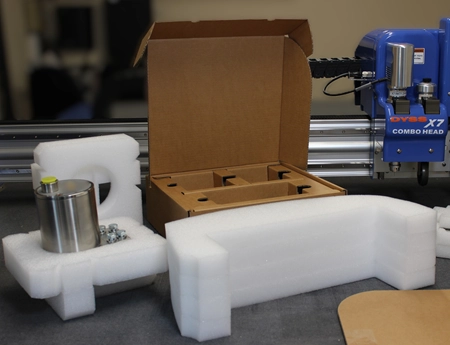
For many packaging manufacturers, DYSS Digital Cutters from AG/CAD play a key role in this stage of the workflow. Designed for packaging and POS display development and full scale production, DYSS cutting tables integrate closely with KASEMAKE Packaging CAD Software to enable high-precision sample cutting and manufacturing. AG/CAD states that the combination of KASEMAKE and DYSS provides “speed, precision and quality” for packaging businesses.
Packaging companies using DYSS systems frequently report major improvements in sample turnaround times and workflow efficiency. One AG/CAD case study noted that businesses could move from concept to physical sample within hours using the integrated KASEMAKE and DYSS workflow.
The DYSS range is especially valuable for
- Prototype creation
- Short-run packaging manufacture
- Transit testing
- POS and display cutting
- Folding carton, corrugated, and foam applications
Because DYSS cutters work directly with KASEMAKE structural files, designers can quickly revise packaging concepts, produce updated samples, and accelerate customer approvals without the delays associated with traditional die-making processes.
Step 6 Prepare files for manufacturing
Once testing and approvals are complete, final production files are prepared for manufacturing.
This includes
- CAD output files
- Print-ready artwork
- Cutting paths
- Creasing rules
- Material specifications
- Production tolerances
Comprehensive packaging CAD software ensures all stakeholders including designers, estimators, die makers, printers, and production operators are working from accurate technical data. Integrated workflows help reduce communication errors and improve manufacturing efficiency.
Why packaging CAD software matters
Packaging design today requires more than creative ideas alone. Structural accuracy, manufacturing compatibility, and workflow efficiency are equally important.
A dedicated packaging CAD platform such as KASEMAKE by AG/CAD helps businesses manage the entire packaging development process, from initial concepts through to production output.
For companies needing full structural design and 3D visualisation capabilities, KASEMAKE provides a comprehensive solution.
For teams focused mainly on fast dieline generation, estimation, and sampling, KASEMAKE Essentials offers an efficient alternative.
Final Thoughts
Designing packaging for a new product involves multiple stages, including product analysis, material selection, structural engineering, visualisation, sampling, and production preparation.
Using the right packaging CAD software can dramatically improve efficiency, reduce development time, and minimise costly production errors.
Whether you need advanced 3D packaging development or simply want to generate accurate dielines quickly for sampling and estimation, KASEMAKE and KASEMAKE Essentials provide flexible solutions tailored to modern packaging workflows.

