
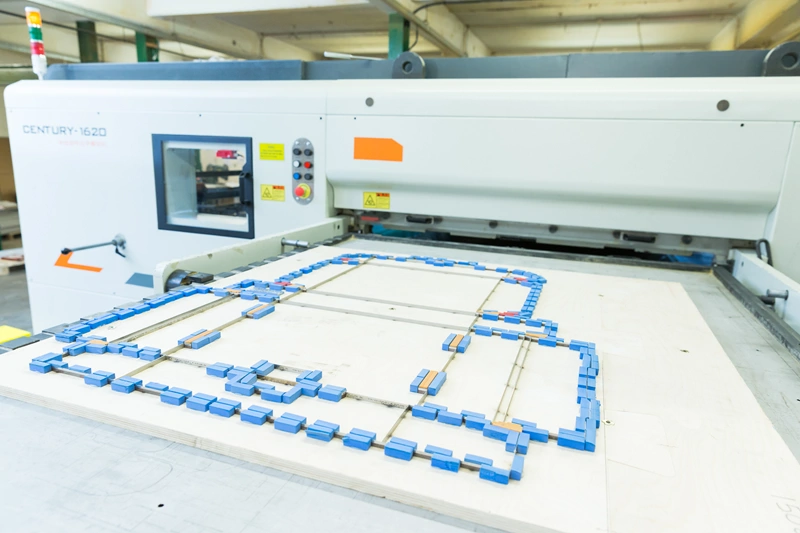
 A packaging dieline is the blueprint for a package. It shows exactly where a package will be cut, folded, creased and glued during production. Whether you are designing folding cartons, corrugated boxes, sleeves, or retail packaging, a well-prepared dieline ensures the final product is accurate, functional, and production ready.
Creating a dieline requires technical precision as well as creative thinking. Understanding the structure and the purpose of each line type is essential for avoiding costly printing and manufacturing errors.
What is a packaging dieline?
A packaging dieline is a flat template that shows the final shape of a package before it is folded and assembled. It acts as a clear guide for printers, cutting teams and packaging manufacturers.
A typical dieline includes
- Cut lines
- Crease or fold lines
- Bleed areas
- Glue tabs
- Ink and varnish-free areas
- Measurements and dimensions
- Guides for artwork placement
Once the design is approved, the dieline is used to create the cutting die or digital cutting file needed for production.
Key parts of a packaging dieline
1 Cut lines show where the packaging material must be trimmed during production. They define the outside shape of the finished package. Cut lines are usually
- Shown as solid lines
- Displayed in a spot colour
- Clearly named for the production team
These lines must be accurate, clear and unbroken. Even a small error can lead to panels that do not fit together correctly. It may also weaken the final package.
Best practice
- Keep cut lines on a separate layer
- Use vector paths only
- Avoid overlapping paths
2 Crease and fold lines show where the material will be folded. These are essential for cartons and boxes that need to assemble cleanly. Typically
- Dashed or dotted lines indicate folds
- Perforations may use different line styles
- Crease positioning affects structural integrity
Improper fold placement can cause cracking, warping or misalignment during assembly.
Best practice
- Ensure fold lines align perfectly with panels
- Allow for material thickness when designing folds
- Test folds on physical prototypes
3 Bleed extends artwork beyond the cut line to prevent unwanted white edges after trimming. Most packaging projects require
- 3mm to 5mm bleed
- Full background extension beyond trim edges
Without sufficient bleed, even slight cutting movement can expose unprinted edges.
Best practice
- Extend backgrounds and images fully into the bleed area
- Keep important graphics away from trim edges
- Confirm bleed specifications with the printer
4 Glue tabs are the sections used to assemble the package structure. These tabs should
- Overlap adjoining panels
- Provide bonding surfaces
- Must remain free from critical artwork, and varnish
Incorrect glue tab sizing can weaken the package or interfere with assembly machinery.
Best practice
- Clearly label glue areas
- Avoid placing text or barcodes on glue tabs
- Consider production tolerances
5 Accurate measurements and dimensions are fundamental to packaging functionality. Dielines should specify
- Width
- Height
- Depth
- Panel sizes
- Fold allowances
- Material thickness considerations
Even minor dimensional errors can affect
- Product fit
- Stacking performance
- Retail shelf appearance
Best practice
- Double check internal and external dimensions
- Design around the actual product size
- Include manufacturing tolerances
The Dieline Creation Process
Step 1 Define packaging requirements. Before creating the dieline, identify
- Product dimensions
- Packaging material
- Weight requirements
- Printing method
- Assembly method
Understanding the package’s purpose helps determine the correct structure.
Step 2 Create the structural layout using vector-based software. Begin drawing
- Main panels
- Flaps
- Closure systems
- Glue tabs
Maintain clean geometry and symmetry throughout the design.
Step 3 Add production lines. Define
- Cut lines
- Crease lines
- Perforations
- Bleed zones
Use standard colour coding and naming conventions for manufacturing clarity.
Step 4 Apply artwork. Once the structure is finalised, place artwork onto the dieline carefully. Remember to
- Align graphics with cuts and folds ensuring the correct orientation
- Avoid placing critical text near creases or in areas that will be obscured
Step 5 Prototype and test. Always create a physical mock-up in the correct material before production. Testing reveals
- Folding issues
- Structural weaknesses
- Artwork alignment problems
- Assembly concerns
Physical prototyping is one of the most effective ways to prevent production errors.
Common dieline mistakes to avoid
Ignoring material thickness Cardboard and corrugated materials have thickness that affects folds and dimensions. Designing without accounting for this can create fitting problems.
Placing artwork too close to edges. Critical graphics near cut lines risk being trimmed unevenly during production. Always maintain safe margins.
Misaligned fold lines. Fold inaccuracies can distort graphics and weaken package structure. Check alignment carefully before exporting files.
Forgetting bleed. Insufficient bleed is one of the most common packaging print issues and can result in visible white edges.
Using raster instead of vector files. Dielines should always be created as vector artwork to maintain production accuracy.
How KASEMAKE software helps with dieline creation. Professional packaging designers often use specialised structural design software to streamline dieline creation. One of the industry-recognised solutions is KASEMAKE software from AG/CAD Limited. KASEMAKE is designed specifically for packaging and display design workflows, helping designers create accurate structural packaging designs more efficiently.
Key advantages include
- Parametric packaging design tools
- Automated folding carton and corrugated templates
- 3D visualisation and prototyping
- Intelligent crease and cut line generation
- Direct integration with production workflows
- Customisable packaging libraries
- Faster revision and modification processes
Because the software is purpose-built for packaging, it reduces many of the manual errors associated with traditional vector drawing methods. For packaging manufacturers and design studios, tools like KASEMAKE can significantly improve
- Accuracy
- Production speed
- Collaboration
- Prototype development
- Manufacturing consistency
Final Thoughts A packaging dieline is more than a flat drawing. It forms the technical base for the whole packaging process. It shows where the material will be cut, folded and glued. It also marks bleed areas and key measurements.
By understanding each part of the dieline, designers can create packaging that looks good and works well. Careful planning and correct measurements help prevent errors during production. Testing the design with a prototype can also highlight issues before the final package is made.
Specialist software such as KASEMAKE can make this process faster and easier. It helps designers create accurate, reliable dielines that are ready for production.
